Posts

Reading 10

Image
Image - GIF - Novel This week we had to apply anymore feedback, if any left on our paragraphs, after that we add to add our author bio with an image of ourselves, we also had to make any changes that were left like make the bibliographies in alphabetical order and then I also added a graphic to one of the paragraphs. The graphic I added was just a simple graphic on AI and the image of me was taking in colllege in first year. Image - Image I used on AI - AI Image - Image I used of me - Me in College Considering that all the work for this module this semester is nearly done, I feel very happy, and I am also proud of the work I have achieved. I feel as though my reading and writing skills have come a long way and I am excited to improve on them even more as time goes on. Next week we will be adding a few more things just to polish stuff up, as I said I am very happy with where I stand with everything at the moment, and I am excited to see the book when it is all complete.

Reading 09

Image
  Image - GIF - Fixing This week I had to give two peers some feedback on their work and I also had to receive feedback and change some of my work around. When giving feedback I firstly just wrote out the general feedback and from there I then highlighted some of the points where I might have seen spelling mistakes, etc. When receiving my feedback, I changed around as much as possible, and I also had to add my h5p link and add all my bibliographies. Images - Screenshots - My comments on peers papers. My h5p link has 3 questions within it and when answered they will give me a good understanding if people gained some of the knowledge they should have from my paper. This week was a light enough task and there wasn’t too much to do, as we have done all of the hard work at the start of the semester now its just all about finishing and polishing everything up before the end of the semester. We now have two weeks off but there is plenty of work to do, I hope everyone has a great Eas...

Tutorial 07

Image
Image - GIF - Complete This week was the final Unity tutorial, and I am happy to be finally finished with them as it helps not having to do them for the remaining weeks as there is lots of other work to be done. This week I had to create a set of instructions for the player using text mesh pro, this was definitely the shortest unity tutorial so far and there wasn’t really too much to it as that was the final touch to the game. Image - My Screenshot - Complete Game I feel that choosing the XR tutorials at the start of the semester was definitely the right option for me as it has thought me a lot of new things and it was definitely more advanced than last semester. I noticed the 2d tutorials had a lot more Unity and the first 4 weeks for me was just watching videos and soing things on paper but that was just so I would understand how XR works before just diving into Unity. I am delighted to be finally finished with Unity for this semester and it was a great experience.

Reading 08

Image
  Image - GIF - Conclusion This week we had to write an introduction and a conclusion to our paragraphs that we have being working on, there was 3 videos linked to the website were our work is provided and they helped me understand what I had to do a little more. When writing my introduction, I tried my best to entice the reader to read on without giving to much away, the whole idea was to give the reader an idea as to what they will be reading and if they find the introduction interesting, they will of course be interested to read some more. It is important that you don’t give a way too much in the introduction because then what would be the point in reading the whole thing. When writing the conclusion, the goal is to explain what everything above means and for me it was explaining were could we possibly go from here with backstories and tragic events. I then had to come with questions and create them on h5p, the questions will help me understand if someone reading my paragr...

Tutorial 06

Image
Image - GIF - Game I found this weeks Unity tutorials to be interesting, they have gotten slightly more difficult, but I still haven’t run into any serious difficulties with them. This week consisted off adding to the tutorials from last week, basically I had to add more stuff for the clamps and change the colour of the clamps and just make it look nicer. Image - Screenshot - Mid Unity Next week will be the last week of Unity tutorials and I feel as though I have come along way since the start of last semester, the fact that these tutorials this semester didn’t feel too difficult proves to me how much I have come along. I’m excited to finish these tutorials off next week because it will make the rest of the semester feel a lot easier without having to do that every week, with that being said I will also miss the tutorials because I have enjoyed them, and they do interest me. Creating games was something I have always wanted to learn so this experience was great for me and I really ...

Reading 07

Image
Image - GIF - Book For this week reading task we had to give two peer’s feedback from last weeks work and we also had to receive feedback and implement it in our work. When giving feedback I read through all the work then wrote the feedback in to a word file and then copy and pasted it to email to them. I then had to receive my feedback and change a few things around. I knew from the lecture on Thursday there was a few little things I had to change then the feedback confirmed it for me, it took me a while to go back over last week’s reading task and get the references, but after that there was only some small changes to be made. This was definitely one of the less time-consuming weeks but it is important to get the paragraphs too the highest standard I can, because they are important for going forward. Next week we will be writing an introduction and a concluision for our review, I am assuming this will be difficult enough but I will have to wait and see.  If cant access post c...

Tutorial 05

Image
  Image - GIF - Gaming Car This week’s tutorials were what I was hoping for, after the first 4 weeks of XR tutorials there was very little Unity, however this week it was some Unity tutorials and I’m excited to finally start them. All though this week there wasn’t much in the tutorials it was more just getting set up and doing some basics, but its fun to get on to Unity. Basically, the first half of the tutorials was just downloading some files and getting the world in Unity set up and then the second half was downloading some assets and adding them into the world with some other small bits. Image - Screenshot - My Unity Work Now that we have finally started using Unity properly with XR I am excited to see what the next tutorials will be and to see exactly what I will be doing. I’m sure the tutorials will get more difficult than this week as this week was easy enough just setting everything up and getting ready for the next tutorials. All though I cant get the full experience f...

Reading 06

Image
Image - GIF - Writing  This week’s reading task was continuing on our writings from the last few weeks, last week I highlighted and gave themes to all the parts I found most relevant in my annotated bibliographies, this week I had to write a paragraph on each theme and use the information I highlighted to help me with that. I found the work we did in the lecture slot definitely helped me understand more as to what exactly we had to do this week and the video linked on the website also helped me see how it is done to high standard. I found that the work this week definitely helped me understand more about writing skills and each week I feel like I’m improving them. It’s definitely difficult to write in this style and would take a long time to get it perfect but I’m definitely happy with where I’m at, at the moment. I think one negative about my bibliographies was that I didn’t put enough quotes in and I can definitely see why that would be important when I got to this stage but ...

Tutorial 04

Image
  Image - GIF - VR This week I had to watch some tutorials, read some articles then go do my own research and of course the quiz at the end. The tutorials this week I found to be interesting and easy to follow, they just get more advanced each week, when it came to reading the articles on the websites provided that was also fine and I found some good information in there, I then had to do my own research with the topics which were provided, I spent a while reading through a lot of articles, trying to find the best ones that I could link to my word file so if need be I would have the best ones in my opinion to look back on. Image - Screenshot - Quiz This week was the end of the 4 weeks of tutorials that I have being working on, I’m not sure what the next 4 weeks will consist of, but these weeks were definitely interesting, and I learned a lot from them, I’m excited to see if these 4 weeks have Unity involved in them because the first 4 hadn’t much unity at all it was just mainly a...

Reading 05

Image
Image - GIF - Scanning This week we had to go through our 10 annotated bibliographies, we had to highlight and add notes and themes to what parts we thought would be useful going forward. Doing this was definitely less time consuming then the last two weeks tasks and it came at a good week considering Game Jam is this week. I have pulled a part everything from my annotated bibliographies and I have a great idea what I will be writing about and trying to achieve when going forward, doing this gives you a better idea of exactly what material you have to work with and gets you thinking what you can do when it comes to writing the literature review. The video that was provided for us to watch this week gave me a much better understanding how exactly you break annotated bibliographies down and what parts are important to highlight, going forward I feel as though I’m starting to get a better understanding of annotated bibliographies, with that being said reading back over my work gave me...

Unity Tutorial 03

Image
  Image - GIF - XR For this week’s tutorials I had to watch some tutorials, do the tutorial with Vuforia SDK and then complete the quiz. The videos were fine and everything was clear, I ran into a problem when it came to the task with the Vuforia asset, I was required to use the Vuforia asset to complete the rest of the task and I couldn’t find the Vuforia asset were the tutorial said, I then went onto the comments of the task and there was comments explaining that apparently Vuforia is no longer available on Unity, this meant I was not able to complete this part of the tutorial but I read through what I would have had to do if it was available so I could learn something from it. When it came to the quiz, I was fine to complete it, even though some questions where on Vuforia I was able to answer them because as I said I read through what I would have being doing anyways. Apart from the problems with Vuforia this week was fine, and I found it to be interesting. Image - Screensho...

Backstory and Tragic Event (Charcter Development) Analysis

Image
Image - GIF - Research This week’s reading task took me a long time to complete, I spent a long-time finding papers and then a long time doing my annotated bibliographies, but with that being said I’m happy with what I have achieved this week. My topic is backstories and tragic events within character development and this week I have found a lot of interesting stuff that is going to help me put my literature review together. I was initially thinking my research would all be about storytelling and so on, but I have gotten information about how certain events can affect player emotions, how AI can be used for characters in game and lots more. When I was first looking for writings to study, I was only using the colleges library, but this week I started to use google scholar which I found to be extremely useful. After a while I started to get used to how to search to get more accurate results and I started to find more keywords to help me along my way. After this week I feel like I hav...

Unity Tutorial 02

Image
Image - GIF - VR   This week’s XR tutorials I found to be interesting and I can notice them getting more advanced than last week’s tutorials. This week I have completed my tutorials a bit late due to some technical reasons, but everything is good now and I will be fine from this point on. For the tutorials, this week I had to build a XR application to a phone and explore it, after that I had to produce a potential app from last week further, watch some videos and the quiz at the end. I found everything to be fine apart from that when installing the museum app onto a phone from unity you can only install to iPhone from a Mac and I have recently just switched to a Windows PC so luckily someone in my house had an android I could use to put the application on. I found the museum app to be interesting and I enjoyed producing my app further and watching the videos gives you a break from doing anything except watch and listen, but you learn a lot from them. I’m excited to start my...

Reading 03

Image
Image - GIF - Spongebob Reading This week we started to put together are first set of annotated bibliography’s and I did find it difficult getting started but as time went on it began to get easier. At the start I just didn’t know how to get started but like anything else you do it gets easier as you go along, the main thing I found to be difficult which I am a bit worried about going forward is finding articles that are what I’m actually looking for, I spent a lot of time trying to find what I actually needed to write up about.    Going forward the writing will definitely get easier with more practice, and I will keep messing around looking for articles and see what key words work the best. This week coming, I hope to get all my articles needed as early as possible in the week so when it comes to writing up on them I will have everything I need.    This week’s reading tasks were definitely difficult but to be honest I find writing interesting and I know it’s a great...

Tutorial 01

Image
Image - GIF - VR For this week’s tutorial we had to choose what we want to work on for the rest of the semester, the choices we have are a 2d game dev, introduction to XR or E learning project. The one I choose to work on was the introduction to XR.  This week’s tutorials I found to be really interesting and was different to what I expected, firstly the tutorials were just watch and listen to videos about XR and then there was some tasks to do. The first task was to test an XR app and fill in the questions about it, the second task was to brainstorm some app ideas then narrow them down to 3 ideas you want to develop, when developing you go into a bit more detail and also do some quick sketches of them.  After all of this to complete the tutorial there was a quiz to take which you had to get 8/12 questions right to pass the tutorial.  Image - Screen shot - Quiz Complete I found these tasks to be interesting and I enjoyed them, I’m excited to see what the next weeks tutoria...

Planning

Image
Image - GIF - I'm Back Hi, I am back after a long Christmas break and I’m excited to get started with semester 2. This week for our reading task we didn’t actually start much work yet. As you can see by the title this week was all about planning, last week we had to pick a topic on what we will be working on for our reading tasks for the rest of the semester and I went with backstory and tragic event within character development, then this week the librarian dropped into our lecture and showed us how to use how to use the online library and how to use refworks properly. All this information will drastically help us with the rest of the semester and our future. So, what I did this week was got set up with the itb library and set up my refworks account, I then created a folder on refworks and start finding interesting write ups about my topic and started to add them to my folder.    This week hadn’t got much work to it was more just about planning ahead and learning how to use t...

Beta

Image
This week I started working on adding the finishing touches and just polishing my game up. Just as I thought I was done I realised when the game over and winner scenes load up you can't actually control them. The thing is when I loaded them from their own scene without going into the game scene they worked perfect but when the game loaded up it activated something I had in my player controller script and what this was, was that the mouse cursor gets turned off. This took me so long to figure out what was wrong, I was researching for hours online and finally I found out the problem. So basically I had to turn the mouse cursor on in the game so now when your playing the mouse is visible. When I figured out the problem I tried to just turn the mouse cursor on in the selected scenes but I couldn't manage it, I wasn't to annoyed about it because to be honest I was just happy I got them scenes controllable.  Anyways my game in now complete and I am really happy with the outcome, ...

Unity Tutorial 10

Image
Image - GIF So Close This week I watched a tutorial on how to make things disappear on trigger the reason I watched this was to add it to my game so when you enter the room downstairs in my house you will see the ghost then when you hit a certain point she will disappear.   I found this tutorial extremely helpful ( link here )   I also watched some tutorials on how to add jump scares, at first, I was considering adding some but adding them is pretty difficult and it was never in my plans to add this and to be honest I’m happy enough without them and I don’t want to do something really difficult and run into errors at this point. As I was saying I watched a few tutorials on it, and I found them interesting but I won’t be adding them.    Right now my game is nearly complete it’s a fully functioning working game at the moment but over the next few days I will spend some time polishing it up just to get it to look a bit nicer and make sure everything is working perf...

Games Testing

Image
Image - Rick and Morty Gif How To Playtest  This video explains that you should always start to play test as soon as possible because if you leave it to late you could realise the game isn't fun or isn't how you wanted it to be after hours of work. Anyone can play test for you once they understand the basics of how the game works. The video explains different types of play testing and also gives examples of different games that had problems that could've being easily fixed with enough play testing. It even explains how some bugs in games can be turned into cool features! Watch the video here. 7 Different Types of Game Testing Techniques This article explains all about different types of game testing, it explains the major risks in game testing and also gives 7 examples and explains them.  Here are the major risks: If the game doesn’t create a compelling experience for the niche audience If the fun ...

Unity Tutorial 09

Image
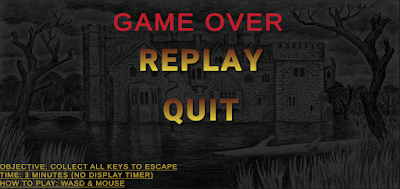
This week I found my own tutorials to follow and add to my game. The first tutorial I found was a tutorial that shows how to end a game when it reaches a certain time. This tutorial was only a short tutorial, but it took me a while to find, I had to watch a lot of videos before I found the right one. (Link to tutorial) When my game reaches a time of 4 minutes this screen comes up: This screen allows you to replay or quit.   Image - Screenshot of my game (My own image)   Second tutorial I followed was one where it creates an end point for my game. This means when the player gets out of the house in my game they will win and get a message showing that they won.  (Link to tutorial) This is the winning screen that will display:   .   Like the other screen there will be an option to replay or quit.   Image - Screenshot of my game (My own image) I found this week’s tutorials extremely useful and it was definitely nice to add on to my game. With them tutorials don...